




















Table of Contents
- • ScreenPal Review Summary
- • About ScreenPal
- • Other opinions about ScreenPal
- • Overview of ScreenPal
- • ScreenPal Review
- • ScreenPal Plans Review
- • ScreenPal Pros & Cons
- • ScreenPal vs Snagit Comparison
- • ScreenPal Usage and Features
- • ScreenPal Subscription Model
- • ScreenPal Return Policy
- • ScreenPal Digital Delivery and Access
- • Contact Information
- • Where to buy ScreenPal?
- • Conclusion of ScreenPal reviews & ratings
ScreenPal Review Summary
ScreenPal is a video creation platform that combines screen recording, editing, and hosting features, often used in education for creating instructional content. It generally performs well by offering a user-friendly experience with integrated tools suited for educators and learners. Its capabilities tend to support teaching and communication needs with some limitations on free usage and advanced features.
Highlights
- Suitable for educators, students, and content creators
- Comprehensive offering including recording, editing, hosting, and AI tools
- Free plan limits recording length and advanced features require paid plans
- Overall solid usability and functionality with a 4.5/5 rating
Within the broader category of screen capture and video editing software, ScreenPal occupies a middle ground between basic free tools and complex professional suites. Alternatives exist for users seeking either simpler free options or more advanced editing capabilities. For a detailed assessment, see the ScreenPal review.
About ScreenPal
Creating and sharing educational videos can be complex without the right tools. Educators often struggle with capturing, editing, and hosting content efficiently. Managing multiple apps can disrupt the workflow and increase time spent on video production.
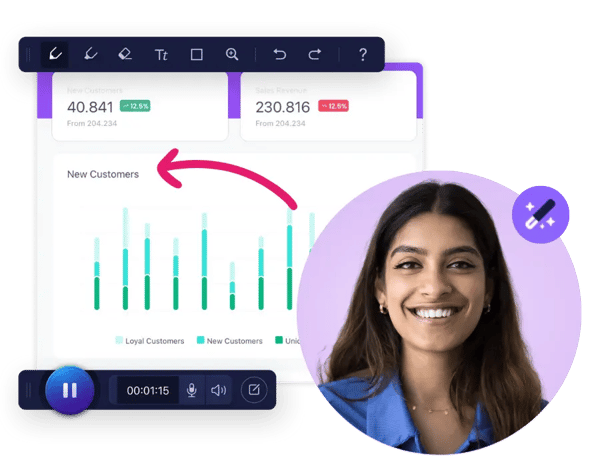
ScreenPal is an all-in-one platform that combines screen recording, video editing, and hosting capabilities. Designed with education in mind, it supports teachers and students in creating engaging video lessons and tutorials. Its features simplify content creation within a single service.
ScreenPal is trusted by millions worldwide, including 98 of the top 100 US universities. Its PCMag Editors’ Choice recognition highlights its balance of functionality and usability. The platform offers cross-device support and cloud hosting with privacy controls to suit educational environments.
This platform suits users needing an integrated video creation workflow but limits free recordings to 15 minutes and caps hosted videos. For advanced features or longer recordings, paid plans are necessary. More details can be found in the ScreenPal review.
Other opinions about ScreenPal
Opinions and insights gathered from trusted review articles and authoritative websites covering ScreenPal.
Overview of ScreenPal
ScreenPal is a software platform specializing in screen recording and video editing, primarily serving the education sector. It provides tools designed to facilitate video creation, sharing, and hosting, supporting users in capturing and editing screen content for various applications. The entity operates globally and targets individuals, educators, and businesses seeking integrated media solutions.
ScreenPal operates on a subscription-based model offering free and paid plans with desktop and mobile apps compatible across major platforms such as Windows, Mac, Android, iOS, and Chromebook. Its service includes a screen recorder, video editor, hosting capabilities, and AI-powered features like auto captions and video generation, positioned within a SaaS framework that supports individual users, teams, and business collaborations. Distribution occurs directly online through its official website.
Since its establishment in 2006, ScreenPal has reached millions of users worldwide, comprising over 100 million videos created across 190+ countries. It holds recognition such as the PCMag Editors' Choice award and maintains a 4.6 rating from over 10,000 reviews. Unique operational characteristics include an integrated cloud hosting platform and AI-enhanced editing tools, with a freemium model allowing 15 minutes per recording in the free tier and scalable paid upgrades for extended features. The platform is also noted for supporting educational video lesson creation and business training content.
ScreenPal Review
ScreenPal is a brand that provides integrated video creation solutions focusing on screen recording, video editing, and cloud hosting. It offers tools designed for a wide range of users including educators, businesses, and content creators. The brand emphasizes ease of use and multi-platform support. Its offerings are available globally with AI-powered features to enhance video production efficiency.

ScreenPal delivers a comprehensive suite of services combining screen capture, editing capabilities, and cloud hosting in a subscription-based model. The platform supports Windows, Mac, Android, iOS, and Chromebook, catering to both individual users and teams. Its features include AI-powered editing tools and flexible hosting options, positioning the brand as a versatile choice in the video creation market.
ScreenPal Highlights- Multi-platform support
- AI-enhanced video tools
- Integrated cloud hosting
- Subscription-based plans
- User-friendly interface
ScreenPal Plans Review
ScreenPal is a multi-platform video creation tool designed for screen recording, video editing, and hosting, supporting Windows, Mac, Android, iOS, and Chromebook devices. It offers an intuitive interface ideal for educators, content creators, and businesses needing an integrated solution for producing instructional or promotional videos.
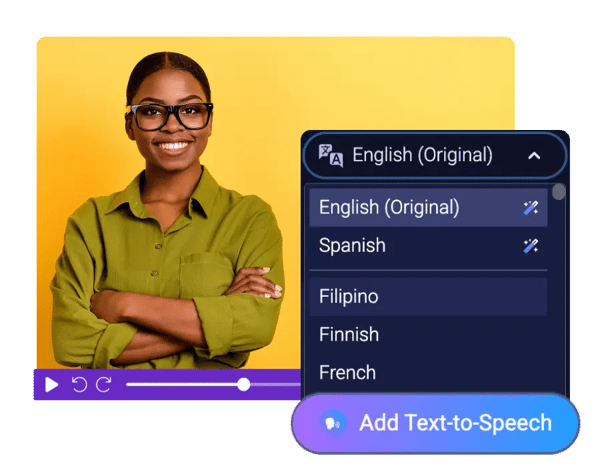
The platform’s free plan allows users to record up to 15 minutes per video and host up to 10 videos with no watermarks, while providing basic editing and sharing features. Paid plans unlock unlimited recording time, advanced AI tools like auto captions and video generation, and enhanced collaboration features suitable for teams.
ScreenPal includes cloud hosting with privacy controls and allows seamless sharing across devices and platforms. Its set of AI-powered editing options and a built-in stock media library further enhance productivity for users looking to create professional content efficiently.
- Free: $0
- Deluxe: $4/month (annual billing)
- Max: $10/month (annual billing)
- Team Business: $8/user/month (annual billing)
Check Price • screenpal.com
ScreenPal Pros & Cons
ScreenPal provides a versatile video creation platform with a user-friendly interface suitable for educators and content creators. It offers strong cross-platform compatibility, integrated video editing, and AI-powered tools that enhance workflow efficiency. The free plan includes unlimited cloud hosting and supports simultaneous screen and webcam recording, which benefits users needing straightforward recording and sharing capabilities.
However, the free plan restricts recording length to 15 minutes and limits video hosting to 10 videos, which may be insufficient for extensive projects. Advanced features and broader export options require a paid subscription, and the desktop app does not support Linux, which limits accessibility for some users. These constraints suggest that ScreenPal is best suited for users with moderate recording needs or those willing to invest in premium plans for professional use.
- • Unlimited cloud hosting on free plan
- • Easy-to-use screen recorder and video editor
- • No watermarks on free or paid videos
- • Cross-platform compatibility with desktop and mobile apps
- • AI-powered tools for captions and video generation
- • Integrated video editing with overlays and transitions
- • Supports screen and webcam simultaneous recording
- • 15-minute recording limit on free plan
- • Advanced features locked behind paid subscriptions
- • Limited image export formats compared to some competitors
ScreenPal vs Snagit Comparison
ScreenPal offers a free plan with unlimited cloud hosting and integrated AI-powered video editing tools, while Snagit does not have a free tier and focuses primarily on screen capture functions. Both support Windows and Mac platforms, but ScreenPal also extends compatibility to mobile devices with Android and iOS apps, providing broader access.
The two differ in their approach to storage and editing: ScreenPal includes cloud hosting within its service, whereas Snagit relies on third-party storage solutions. Snagit requires an annual subscription fee of $39, while ScreenPal provides a freemium model with tiered paid plans unlocking advanced features.

- Free plan with unlimited cloud hosting
- Integrated AI video editing
- Supports Windows, Mac, Android, and iOS
- Freemium pricing with tiered subscriptions

- No free plan, trial available
- Focus on screen capture tools
- Supports Windows and Mac only
- Annual subscription fee of $39
ScreenPal Usage and Features
ScreenPal allows users to record screens, webcams, or both across desktop and mobile platforms. It integrates video editing tools such as trimming, captions, overlays, and AI enhancements for streamlined content creation. The platform supports simultaneous screen and webcam recording, facilitating versatile video production.
The service also provides cloud hosting with privacy controls and video analytics, enabling secure sharing and collaboration. Additional features include interactive quizzes and story-based video tools designed to support educators, marketers, and content creators. This combination promotes efficient workflows while maintaining simplicity and cloud integration.
ScreenPal Subscription Model
ScreenPal uses a freemium subscription model that provides free basic access with limits and paid plans that unlock additional features. The free plan restricts recordings to 15 minutes and limits hosted videos to 10. Paid subscriptions remove these limits and add advanced AI tools, multi-user collaboration, and access to a stock media library. Subscriptions can be purchased with monthly or annual billing options through online checkout.
This subscription structure caters to a range of users from individuals to teams by balancing feature availability and cost. Paid tiers include Deluxe, Max, and Team Business plans, offering scalable options based on user needs. Cancellation of paid plans results in automatic downgrade to the free tier, maintaining continuous access to basic tools. This model supports flexible use cases while controlling access to premium functionality.
ScreenPal Return Policy
The return policy details for this product or service are not publicly available. There is no specific information regarding the number of days allowed for returns, nor any fees associated with the process. Additionally, no clear conditions have been stated for returns, providing limited transparency on the subject.
Customers should be aware that the return guidelines may not be outlined openly or in detail. There are no officially listed exclusions or policies explaining what items may not qualify for return. This lack of information means customers must seek further clarification directly from the provider if they require specific return terms or conditions.
ScreenPal Digital Delivery and Access
The product is delivered exclusively through digital means, available globally via online access. Users can obtain the software through digital download or access it directly from a cloud-based platform. There are no physical shipments involved, and no regional delivery restrictions are noted.
Access to the software and associated services is immediate upon purchase, allowing users to start using the product without delay. There are no physical tracking or shipping fees as the delivery is entirely digital. Users typically manage their access and content through an online account or dashboard provided by the service.
Contact Information
Users can reach support primarily through the website where various resources are provided. Assistance is available via a help center and a contact sales page, but direct phone, or live chat are not publicly offered.
- Email at [email protected]
- Support center via website help center
- Contact form for sales inquiries
For immediate help, users should consult the available online documentation. Support topics include product features, subscriptions, technical issues, hosting, and billing.
Where to buy ScreenPal?
Users can purchase ScreenPal officially through its website, where account management and support resources are directly accessible, providing a structured and reliable experience. By visiting screenpal.com, customers can expect subscription options with clear policies on access and use. While the platform is primarily distributed online, offline availability is not typical; therefore, users may encounter variations in service or policies if attempting to obtain it elsewhere. This central online approach ensures consistency, though marketplace reliability and terms may differ outside this channel.
Conclusion of ScreenPal reviews & ratings
ScreenPal has established itself as a notable tool in the screen recording and video editing category, providing a seamless combination of recording, editing, and hosting features. Its cross-platform availability and user-friendly interface make it a practical choice for a wide range of users, with reliable resources found at screenpal.com.
Users interested in exploring the platform’s capabilities can gain further insight by revisiting the detailed ScreenPal review, which offers balanced observations to help form an informed perspective on the software’s strengths and limitations.
Editorial notes reflect aggregated buyer feedback and our independent editorial review of publicly available information. They are for informational purposes only and do not constitute endorsements. Purchases are made at your own discretion, and we are not responsible for transactions or outcomes related to this store. Experiences may vary. This content is assisted by AI and reviewed by our editorial team. While we strive for accuracy, AI-supported information may not always be 100% precise, so please verify any critical details.

